


The AI recommends you set the limits
Budget changes are being designed to stay within the rules you set. Every change above your threshold waits for approval, and the emergency stop button is in the dashboard today.
Daily and monthly caps, approval thresholds and an emergency stop keep spending under control at all times.
The emergency stop is live today; budget rules are on the roadmap.
Share your goal and we’ll get back to you.
Daily spend stops as it nears the cap; going over requires your approval.
Predictable spendingRoadmap
No end-of-month surprises.
Approval thresholdRoadmap
Major changes need your approval.
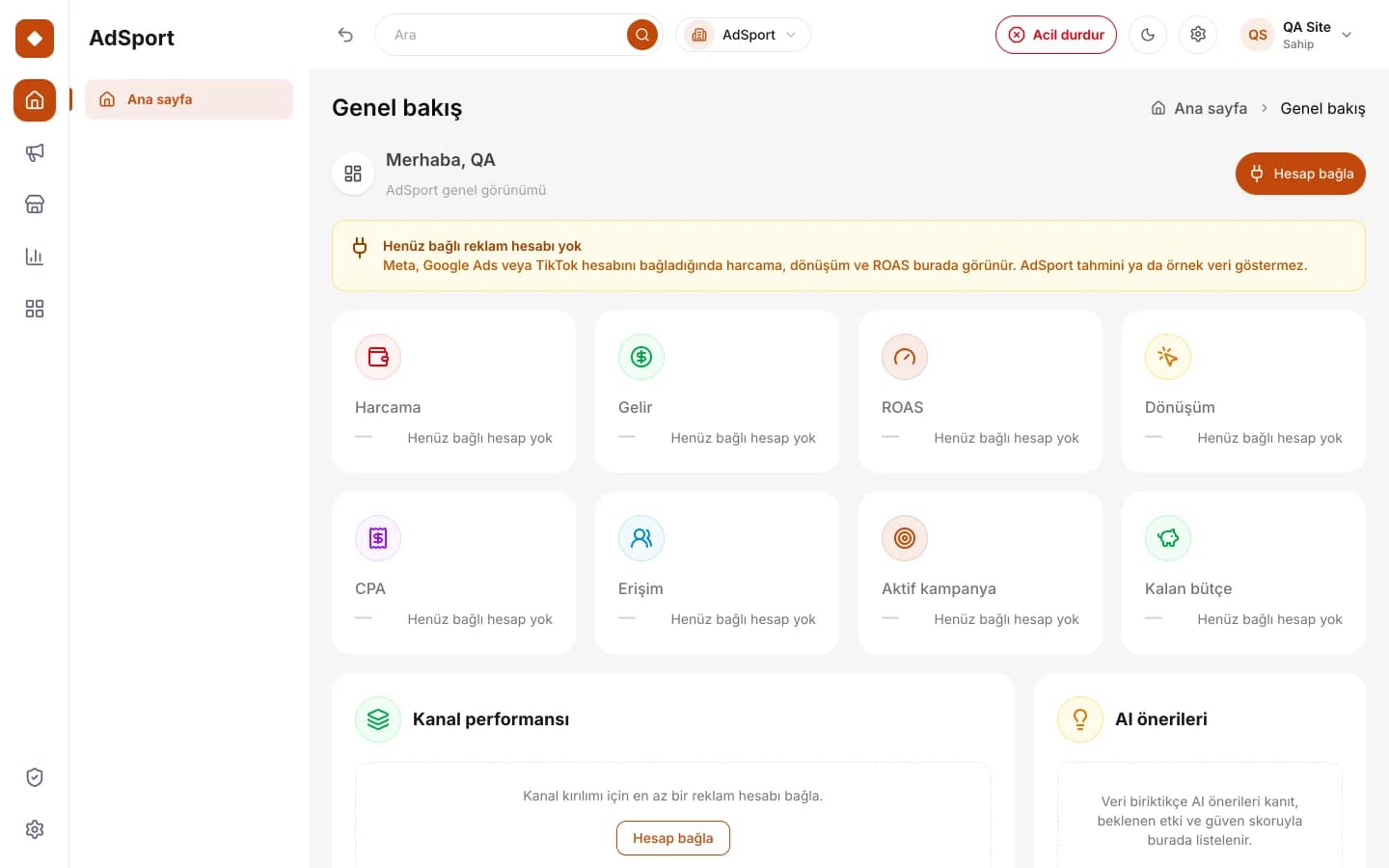 Real dashboard screen
Emergency stop
All delivery stops with one click.

Audit trailRoadmap
See who changed what.

CapsRoadmap
Daily and monthly limits.

ThresholdsRoadmap
Changes that require approval.

MonitoringRoadmap
Spend is tracked against the cap.

Intervention
Emergency stop when needed.
No. Once the budget rules engine opens, the AI will only be able to make recommendations; no increase will be possible above the daily and monthly caps you define. Every change above the threshold is also being designed to wait for your approval.
The emergency stop is a button that lets you halt campaigns in one step from the dashboard, and it is live today. As ad account connections open in stages, it is designed to cover campaigns in all connected channels.
The threshold depends on your business’s appetite for risk and its approval structure. Pre-authorizing small adjustments saves time, while tying critical amounts to approval preserves control. Once the rules open, you will be able to update the threshold whenever you like.
No, they complement them. Ad platforms’ own budget settings remain in effect. AdSport’s rules add an overarching framework that covers all channels, so total spend stays under one cap even when each channel has its own limits.

The form takes one minute.
Budget changes are being designed to stay within the rules you set. Every change above your threshold waits for approval, and the emergency stop button is in the dashboard today.
Budget optimization means shifting spend toward the channels and periods that deliver better results. Handing this work to AI can save time, but automation without clear limits can also lead to spending a business cannot afford.
On AdSport, the principle is clear: the AI can recommend budget changes but cannot go beyond the limits you define. No increase is made above the cap your business allows, and every change above the threshold you set waits for human approval.
Some of these rules are on the roadmap. The safeguard that is live today is the emergency stop: you can halt all campaigns in one step from the dashboard.
You set daily and monthly upper limits for total spend. No recommendation or automated action can go above these caps, so you can allocate budget with your cash flow in mind.
You decide by how much a channel’s budget can rise or fall in a single step. This prevents sudden, large shifts and keeps changes gradual and traceable.
Small adjustments below the amount you set can be applied under authority you have granted in advance. Every change above the threshold is sent to you with its reasoning and is not applied until you approve it.
When you spot a problem, you can halt campaigns with a single button in the dashboard. The emergency stop is live today and is designed to cover all connected channels as ad account connections open.
Designed for businesses that need to watch their budget closely and want to benefit from automation without handing over spending decisions entirely.
Businesses whose monthly ad budget is set in advance and must not be exceeded can safeguard their spending with cap rules.
Brands spending on many channels at once can set limits on the total rather than per channel, so the budget doesn’t scatter.
Organizations where spending decisions must be approved by specific people can set the approval threshold to match their own authority structure.
Where budget changes proposed by an agency need to be seen and approved by the client, the rules provide a transparent framework.
You set the daily and monthly caps, the maximum change rate for a single step and the approval threshold. You will be able to define these rules separately for each brand or campaign.
Based on performance data, it calculates which channels could receive more budget and which less. The recommendation comes with reasoning that explains the metrics it relies on and its expected effect.
Every recommendation is compared with the rules before it is applied. A recommendation that exceeds the cap is rejected, one that exceeds the change rate is pulled back to the limit and one above the threshold is sent to you for approval.
The change you approve is applied, and who made it, when and on what grounds is recorded. You can halt all campaigns with the emergency stop at any time.
The key indicator of budget control is the gap between planned and actual spend. How close you are to the daily and monthly caps and how quickly each channel is using up its budget will be tracked on one screen.
The impact of changes is measured as well. After a budget shift, ratios such as CPA and ROAS are tracked to see how they changed, so over time it becomes clear which recommendations actually help your business.
Metrics we track: Daily spend · Monthly spend · Cap usage · CPA · ROAS · Pending approval
The emergency stop is available in the dashboard today. The budget rules engine covering daily and monthly caps, change rate and approval threshold is on the roadmap.
Emergency stop
The dashboard has an emergency stop button for halting campaigns in one step; you can use it the moment you notice a problem.
Roles and permissions
You can invite team members and assign roles to decide who can carry out which actions.
Daily and monthly caps
Cap rules that limit total spend at the daily and monthly level will open together with the budget rules engine.
Change rate and approval threshold
Rules for the maximum change allowed in a single step and for human approval of changes above the threshold are on the roadmap.
Live: available today at app.adsport.com.tr. Roadmap: in development, not yet available.
In a demo, we’ll show the emergency stop and how the budget rules on our roadmap will work with your budget structure.